
Quick answer: Azure cost optimization is the ongoing process of reducing unnecessary Azure spend while maintaining, or improving, the business value your cloud delivers. It covers four areas: gaining cost visibility, eliminating waste through rightsizing, locking in commitment-based discounts, and building FinOps governance to sustain savings over time. Effective Azure cloud cost management means connecting every dollar of spend to a business outcome, so teams know which spend to protect and which to cut. Most organizations that struggle with Azure costs aren’t spending too much, they’re spending without enough context to know what’s worth it.
Azure is flexible by design. You provision resources in minutes, scale on demand, and pay only for what you use. That flexibility is also what makes costs hard to control.
Billing runs per second. Cloud-native architectures such as microservices, containers, Kubernetes, create hundreds of cost dimensions that native tools can’t fully attribute.
According to CloudZero’s 2024 State of Cloud Cost report, 89% of engineering and finance professionals say a lack of cloud cost visibility prevents them from doing their jobs effectively.
This guide covers the Azure cost management strategies, tools, and framework used by engineering and finance teams to bring Azure spend under control, and keep it there.
What Is Azure Cost Optimization?
Azure cost optimization is the ongoing process of matching Azure spending to actual business value. It combines financial visibility, resource efficiency, pricing strategies, and organizational accountability to ensure every dollar spent on Azure is justified.
Done well, it’s not just cost reduction. It’s knowing which spend to cut, which to protect, and where to invest more to maximize returns.
playbook
The AI Cost Optimization Playbook
Traditional cloud cost management is broken. Here’s why — and how to make the switch to cloud cost intelligence.
What Is The Azure Cost Optimization Framework?
Effective Azure cost optimization follows a four-stage sequence: visibility, rightsizing and efficiency, commitment-based discounts, and governance and accountability. Skipping stages doesn’t save time — it produces optimization decisions without the context to make them correctly.
The four stages: Visibility → Rightsizing and efficiency → Commitment-based discounts → Governance and accountability.
Each stage builds on the one before it.
Stage 1: How do you establish Azure cost visibility?
You can’t optimize what you can’t see. Before any other action, teams need accurate, granular visibility into what Azure is actually spending, and why.
Start with Azure’s native monitoring stack — several tools are available at no additional cost.
Azure Cost Management + Billing is the primary interface for tracking and analyzing spend across subscriptions.
Azure Monitor collects metrics, logs, and traces across resources, applications, and infrastructure.
Azure Application Insights detects and analyzes incidents across applications and their dependencies.
Azure Advisor evaluates resource settings and usage data, surfacing recommendations across cost, performance, reliability, and security.
Azure Log Analytics enables deeper querying of log data to troubleshoot issues and identify cost anomalies faster.
These tools provide a solid starting point. Their main limitation is aggregation, they surface totals and averages, not cost per unit of business value.
Tag your resources consistently. Azure tags assign plain-text key-value pairs to resources (e.g., Environment = Production, Team = Platform). Tags are the foundation of cost allocation. They let you break down spend by team, product, environment, or project. CloudZero’s State of Cloud Cost Intelligence report found only 13% of companies have allocated at least 75% of their cloud costs. Incomplete tagging is the primary reason.
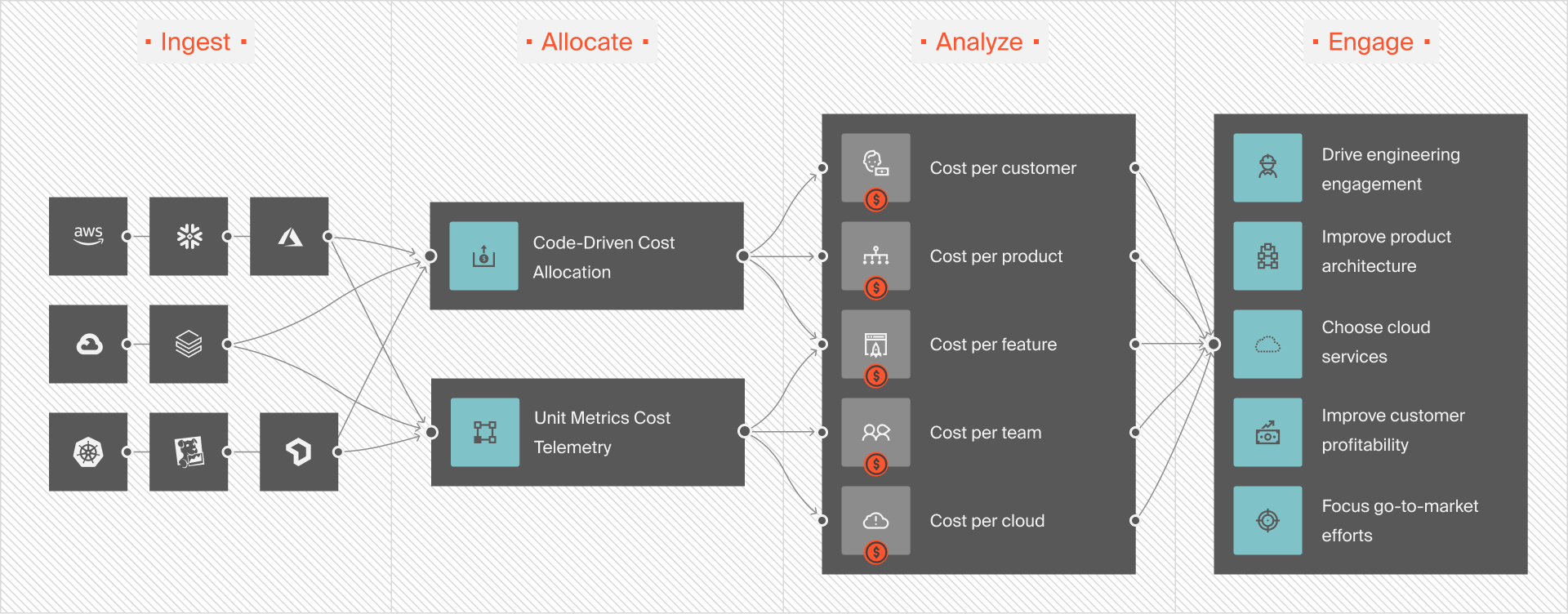
CloudZero allocates Azure costs to teams, products, features, and customers, without complete tags. For teams with high resource velocity or complex shared infrastructure, this closes the attribution gap that native tools leave open.
Set up continuous cost monitoring. A one-time audit doesn’t hold. Azure environments change constantly, new services spin up, workloads shift, configurations change. Continuous cloud monitoring catches cost anomalies in real time, before they compound into budget overruns. For a full breakdown of tools that support this, see Azure cost management tools.
Stage 2: How do you rightsize and eliminate Azure waste?
Once you have visibility, the next step is removing spend that isn’t delivering value. Most Azure environments carry a lot of waste. Think of idle resources, overprovisioned VMs, and underutilized storage. Five tactics deliver the highest-ROI waste reduction in most Azure environments.
Align VM schedules with actual usage. Many workloads don’t run around the clock — shutting down VMs during nights and weekends is one of the fastest ways to cut Azure costs with no performance impact. Azure Virtual Machine Automatic Shutdown handles this automatically.
Set up VM autoscaling. Autoscaling dynamically adjusts compute, memory, and storage to match workload demand. Azure Autoscale reduces costs by terminating redundant VMs once peak load passes, eliminating the common pattern of provisioning for maximum capacity and leaving that capacity running at 20% utilization.
Rightsize underutilized resources. Azure makes it straightforward to resize VMs without long-term commitments. The VM type table below maps workload types to the right series.
VM Series | Use case |
A, B, D (General Purpose) | Dev/test, small to medium databases, low-to-moderate traffic servers |
F (Compute Optimized) | Web servers, batch processes, mid-size business apps |
E, M, D (Memory Optimized) | Relational databases, in-memory analytics, large caches |
Ls (Storage Optimized) | Big data, SQL/NoSQL data warehouses |
N (GPU Optimized) | Video rendering, graphics, deep learning |
H (High Performance Compute) | Financial simulations, demanding scientific workloads |
Use Azure Elastic Database pools. For multi-database workloads with varying usage patterns, elastic pools share resources across databases rather than allocating dedicated capacity to each — producing meaningful savings when peak loads occur at different times.
Apply Azure storage tiering. Azure Blob Storage offers Hot, Cool, and Archive tiers based on access frequency. Lifecycle policies automate tier transitions for infrequently accessed data without touching performance for active data.
Stage 3: How do you lock in Azure commitment-based discounts?
Once your environment is rightsized, commitment-based pricing becomes much safer to use. The most common mistake is committing before rightsizing. Locking into capacity you’ll end up shutting down or replacing.
Azure Reserved VM Instances (RVIs) deliver up to 72% off pay-as-you-go pricing for one- or three-year commitments. They apply across App Service, Azure Cosmos DB, Azure Storage, Azure SQL Database, and Azure Synapse Analytics. Payment options include full upfront or monthly.
Azure Savings Plans for Compute offer up to 65% off in exchange for a fixed hourly spend commitment over one or three years. Unlike reservations, Savings Plans apply across instance types, operating systems, and regions, which makes them more flexible for teams whose workload profiles shift over time.
Azure Hybrid Benefit lets organizations apply existing Windows Server and SQL Server licenses with active Software Assurance to Azure resources at no additional charge. RedHat and SUSE Linux subscriptions are also eligible. Per Microsoft’s Azure Hybrid Benefit pricing page, savings range up to 40% off Azure VMs and up to 85% off SQL Server workloads. Combined with Reserved Instances, the total discount can reach 80% or more.
Azure Spot VMs provide access to spare Azure compute capacity at discounts up to 90% off pay-as-you-go rates. Azure can reclaim Spot capacity with 30 seconds’ notice, so this option works best for interruptible workloads: batch jobs, rendering, dev/test, and advanced analytics.
Azure Dev-Test pricing gives Visual Studio subscribers up to 65% off on select services such as Windows VMs, Azure App Service, Azure SQL Database, and Azure Logic Apps, for non-production workloads.
Regional pricing differences are also worth factoring in. Azure pricing varies by region, sometimes significantly for the same instance type and configuration. For workloads without geographic latency constraints, running in a lower-cost region within the same geography can produce savings. Use the Azure pricing calculator to compare regions before committing, or CloudZero Advisor to compare instance options by region, service, and pricing filter across your actual environment.
The table below summarizes how each discount option compares:
Discount type | Maximum savings | Flexibility | Best for |
Reserved Instances | Up to 72% | Low — fixed VM type, region, term | Stable, predictable workloads |
Savings Plans | Up to 65% | High — any compute, region, OS | Variable workload profiles |
Azure Hybrid Benefit | Up to 85% (80%+ combined) | Medium — license-dependent | Organizations with existing Windows/SQL licenses |
Spot VMs | Up to 90% | High — interruptible only | Batch, rendering, dev/test |
Dev-Test pricing | Up to 65% | Medium — non-production only | Development and test environments |
For more on how these instruments integrate with your Azure environment, see CloudZero’s Microsoft Azure integration page.
Stage 4: How do you build Azure cost governance and accountability?
Visibility and efficiency create savings. Governance makes them last.
Azure Policy provides centralized control over resource governance. It enforces guardrails across subscriptions in real time, automates resource remediation at scale, and prevents configuration drift that leads to unchecked cost growth. It keeps cost discipline institutional, instead of individual.
Azure Price Match lets you apply for a price match against equivalent Amazon services within 90 days, covering compute, storage, and serverless. It’s narrow in scope but worth running for high-volume services where comparisons are clear.
Cost allocation by business dimension is where governance becomes strategic. Instead of tracking total Azure spend, high-performing FinOps teams track cost per unit of business value: cost per customer, cost per product, cost per feature, cost per environment. This is the shift from “how much did we spend?” to “was it worth it?”
For example:
- Cost per customer tells your marketing team which segments carry the highest gross margin, and which your pricing model may be undercharging for
- Cost per feature tells your product team which capabilities are expensive to run relative to their usage, flagging candidates for retirement or repricing
- Cost per team creates direct accountability, engineers can see the cost impact of their architectural decisions before those decisions compound
This level of granularity turns cost data into operational decisions. CloudZero maps Azure spend to teams, products, features, and customers in real time, without complete tagging, so teams can answer margin and pricing questions with actual data, not estimates. For more on this approach, see CloudZero’s unit cost solution and showback by team.
Azure Cost Optimization Tools: Native Vs. Third-Party
Azure FinOps is the practice of applying financial accountability to Azure cloud operations — bringing engineering, finance, and business teams together around shared cost data to make faster, more informed decisions about where to invest, optimize, or cut spend. Azure’s native tooling covers the basics; third-party platforms close the gap at scale.
Azure Cost Management + Billing surfaces spending by subscription, resource group, and service. Azure Advisor generates rightsizing and commitment recommendations. Azure Policy enforces governance guardrails. Together, they give teams a workable foundation.
The gap emerges at scale. Native tools show aggregated cost data. They don’t map spend to business context, and they don’t generate real-time alerts tied to unit economics. For organizations with complex architectures, multiple teams sharing infrastructure, or AI workloads where cost attribution is especially difficult, third-party platforms fill that gap.
For a full breakdown of what’s available, see Azure FinOps tools and Azure cost management tools.
How Does CloudZero Approach Azure Cost Management?
Most Azure cost tools show you what you spent. CloudZero shows you why, and whether it was worth it.
CloudZero maps Azure spend to the teams, products, features, and customers driving it, in real time, without complete tagging. That means 100% of your cloud costs are allocated and attributable, even across complex shared infrastructure, Kubernetes clusters, and multi-cloud environments.
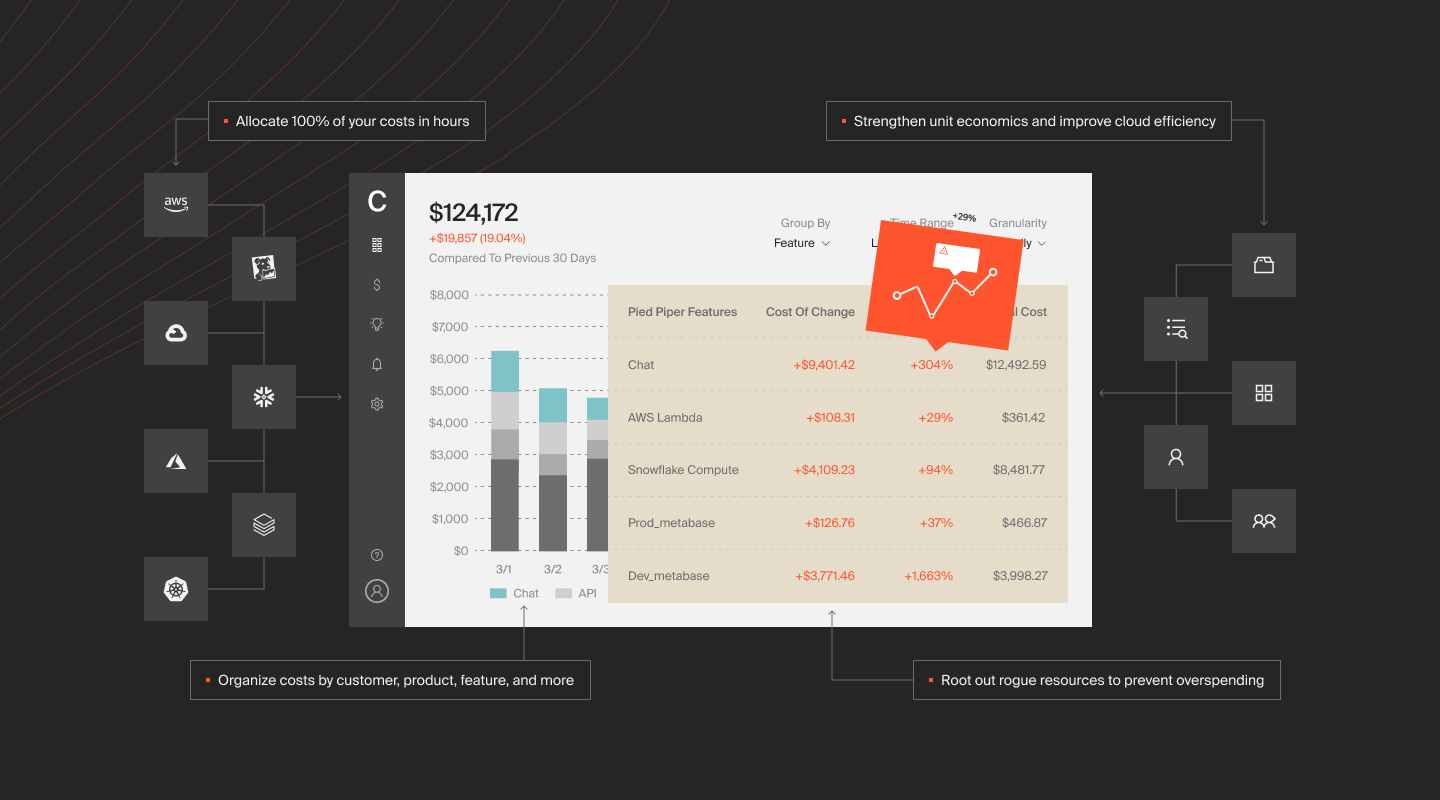
Engineering teams see cost per deployment, service, and environment. Finance teams see cost per customer, COGS, and gross margin. When a cost spike happens, everyone knows exactly what caused it and who owns it.
CloudZero also surfaces anomalies the moment they appear, alerts routed directly to Slack or email, so teams can act before an incident becomes a budget problem.
The numbers speak for themselves. Upstart used CloudZero to reduce cloud costs by $20M. PicPay saved $18.6M in annual cloud spend. SonicWall increased engineering cost engagement by 6x. Your organization can get the same visibility.  to see how it works for your environment. You can also start with a free cloud cost assessment to benchmark where you stand today.
Frequently Asked Questions About Azure Cost Optimization